
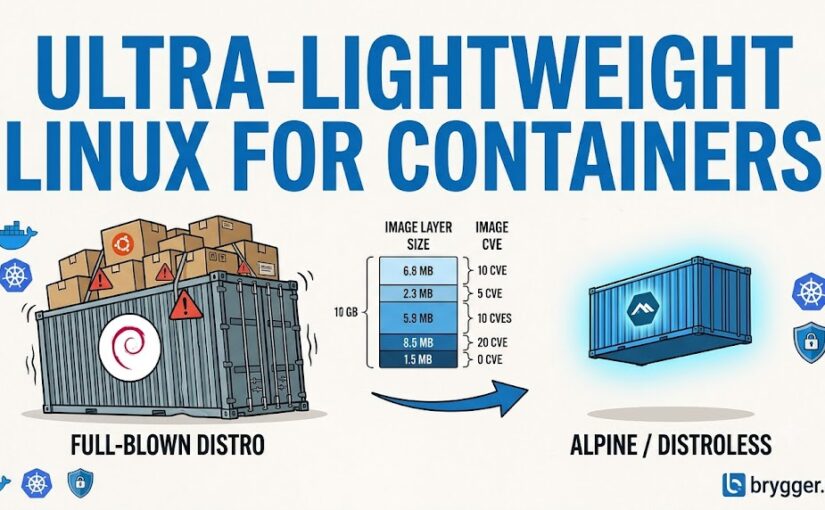
If you have spent any significant amount of time managing containerized environments, you know the pain of the “weekly CVE scramble”. You run a vulnerability scan on your pristine production application, only to find a wall of critical CVEs originating from packages your code doesn’t even touch. Why does a Go API or a Node.js microservice need a suite of device drivers, a package manager, or five different text editors sitting in its container layer?
They don’t.
For years, the industry defaults have been full-blown Linux distributions like Ubuntu or Debian. While great for local development because “everything just works,” they introduce immense operational debt in production. Let’s break down why—and how—to transition to ultra-lightweight base images like Alpine Linux, Distroless, or even raw Scratch.
The Base Image Scale: From Bloat to Bone
To understand what you are saving, we have to look at the baseline image sizes.
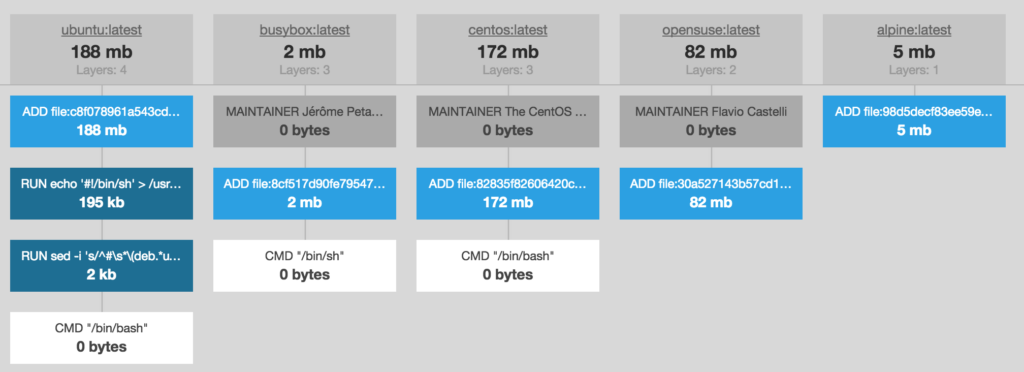
The visual difference is stark. The spectrum of what you can build on generally falls into four tiers:
- The Heavyweights (Ubuntu/Debian/CentOS): (~100MB – 180MB+). These include full GNU coreutils, package managers (
apt,yum), and extensive library support. - The Slims (Debian Slim): (~74MB). A stripped-down version of the standard distro, removing heavy man pages, documentation, and translations. It still uses the standard
glibclibrary. - The Micro-Distros (Alpine Linux): (~5MB). Built on BusyBox and
musl libcinstead of GNU tools. It retains a shell and a lightning-fast package manager (apk) but drops almost everything else. - Distroless & Scratch: (0B – 2MB). The absolute bare minimum. Scratch is completely empty. Distroless includes only your application runtime, CA certificates (crucial for TLS), timezone databases, and essential users/groups. No shell, no package manager.
Why Shrink the Footprint?
The arguments for making this transition extend far beyond simply saving disk space on your SAN or local hypervisor:
- Minimal Attack Surface: Hackers can’t exploit tools that aren’t there. If there is no shell (
shorbash) and no package manager (aptorapk), an attacker who exploits an application-level vulnerability cannot easily run commands, install malicious curl scripts, or pivot into your internal network. - No More CVE Fatigue: Security scanners like Trivy or Wiz work by checking the installed packages database. A Debian base container may show hundreds of “vulnerabilities” because of old system utilities you never use. Transitioning to Alpine or Distroless often drops your security alert count straight to zero.
- Lightning-Fast Deployments: In auto-scaling environments or Kubernetes clusters, cold-start time is everything. Pulling a 5MB base image takes a fraction of a second, whereas pulling a 200MB image across hosts under heavy load creates severe bandwidth bottlenecks.
The Major Pitfall: Glibc vs. Musl
The single biggest gotcha when migrating to Alpine is its C Standard Library. Almost all major Linux distros rely on glibc (GNU C Library). Alpine uses musl libc.
For pure runtime languages like Python or Node.js, the interpreter usually abstracts this away. However, if your application relies on native C extensions (like certain cryptographic modules, DB drivers, or JNI libraries in Java), compile-time assumptions will break.
If you try to run a binary compiled against glibc inside Alpine, you will often get a highly unhelpful, misleading error:
sh: ./my-binary: No such file or directoryThis is actually the dynamic linker complaining that it cannot find the glibc runtime libraries it expects to map into memory.
The Fixes:
- Multi-Stage Builds: Compile your application inside a fat builder container (which has the full build toolchain and
glibc/muslas needed), then copy only the static artifact into your minimal production container. - Static Linking: If you are writing in Go or Rust, instruct your compiler to statically link all C libraries. For Go, this means disabling
cgoduring compilation:CGO_ENABLED=0 GOOS=linux go build -o app. - Use Glibc-compatible minimal alternatives: If your stack absolutely demands
glibc, look intodebian-slimor Glibc-based Distroless images instead of Alpine.
Best Practices for the Transition
Transitioning requires a shift in how you design your Dockerfiles and how you operate your containers.
1. Leverage Multi-Stage Builds
Your development environment needs tools; your production runtime does not. Separate them cleanly:
# Stage 1: Build the binary
FROM golang:1.22 AS builder
WORKDIR /src
COPY . .
RUN CGO_ENABLED=0 GOOS=linux go build -a -installsuffix cgo -o main .

# Stage 2: Final minimal runtime
FROM alpine:3.19
RUN apk --no-cache add ca-certificates
WORKDIR /root/
COPY --from=builder /src/main .
USER 10001
CMD ["./main"]
2. Bulletproofing Health Checks Without Curl
In a fat Debian container, you might write a HEALTHCHECK using curl to ping an API endpoint. On Alpine or Distroless, curl won’t be there by default.
Do not install curl just for a health check—that defeats the purpose. Instead, make use of Alpine’s lightweight built-ins like wget:
HEALTHCHECK --interval=30s --timeout=3s \
  CMD wget --quiet --tries=1 --spider http://localhost:8080/health || exit 1
For ultra-minimal or Distroless containers where even wget is stripped out, you can handle health checks at the orchestrator layer (like Kubernetes liveness/readiness probes) or write a tiny, self-contained health checker binary in Go/Rust and copy it into the final container. Or, if your shell allows, use a silent, native bash TCP socket check:
exec 3<>/dev/tcp/127.0.0.1/8080 && echo -e "GET /health HTTP/1.1\r\nHost: localhost\r\nConnection: close\r\n\r\n" >&3 && cat <&3 | grep "200 OK"3. Debugging Distroless (Where is my Shell?)
One of the most common complaints from teams migrating to Distroless is, “How do I troubleshoot if I can’t docker exec -it or kubectl exec into the pod?”
The modern cloud-native answer is ephemeral debug containers. Instead of shipping debugging tools to production, you inject them on demand at runtime.
If you are running Kubernetes, you can attach a debug container (loaded with busybox or custom troubleshooting tools) directly to your running pod’s process namespace:
kubectl debug -it my-running-pod --image=busybox --target=my-app-containerThis gives you all the diagnostics you need without compromising the security posture of your production image.
The Verdict
Transitioning to ultra-lightweight container base images is one of the highest-leverage engineering decisions an operations team can make. It slashes your CI/CD storage bills, accelerates deployment pipelines, and virtually eliminates security noise from inactive packages.
Start by auditing your internal services. Any compiled languages (Go, Rust) should be migrated to scratch or distroless immediately. For interpreted environments (Node, Python), test an Alpine-based equivalent—just keep an eye out for dynamic linking issues.
Your container registries, security auditors, and hypervisors will thank you.